
Screens
MC GUI
MC GUI is a server plugin that puts HTML pages in the game. Put a page in a folder and players see it on a wall they can walk up to and click, or fullscreen, where they point with their mouse and click like on a computer. Vanilla clients, no mods.
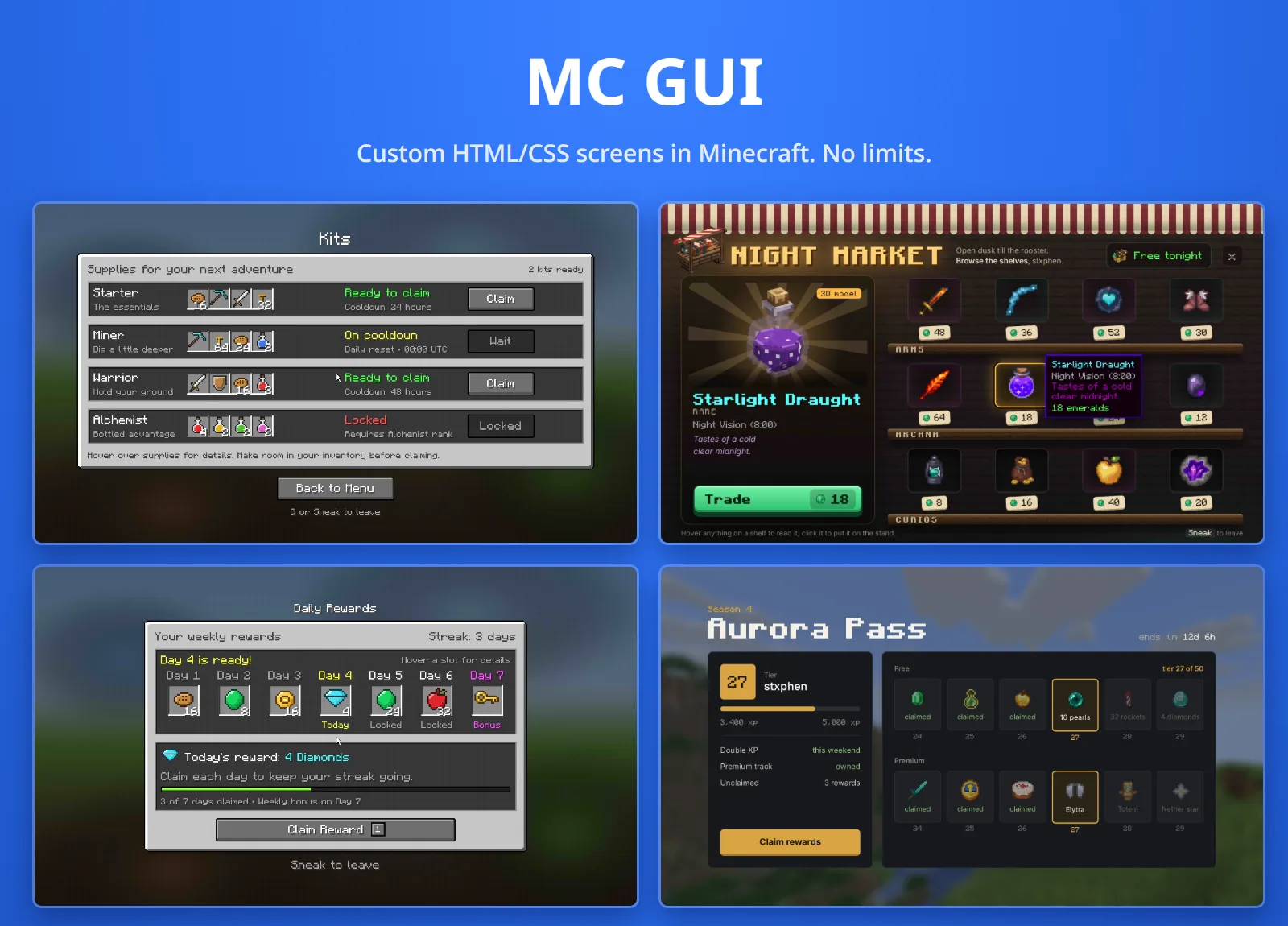
- Server owners write pages in HTML and CSS (or make them in the free editor at mcgui.dev), and give their buttons commands, links and sounds. No code.
- Developers open those pages from their own plugin and hear every click as an event, or draw their own pictures on walls and fullscreen.
No browser runs on the server. MC GUI has its own HTML and CSS renderer, so a page is static HTML and CSS: no JavaScript. Links, commands, hover states, scrolling, sounds and form controls are made to work in game instead.
Installing#
- 1
Get the jar
Download MC GUI from resourcepack.ai/mcgui or SpigotMC.
- 2
Drop it in
Put the jar in
plugins/and restart. It runs on Spigot or Paper 1.21.11 or newer, one jar for both, and needs Java 21 (Java 25 for 26.x). PlaceholderAPI is optional. Players need nothing installed. - 3
Set the pack's address
MC GUI builds a small resource pack and serves it itself, on port
25602. On a real server, open that port and setresource-pack.public-urlinconfig.ymlto the address players reach it at, then restart. See The resource pack. - 4
Try an example
Run
/mcgui open market. Sneak to get up.
What it makes:
plugins/MCGUI/
  config.yml
  pages/        ← your pages: menu, rules, shop and market to start from
  sounds/       ← .ogg files to put in the pack
  cursors/      ← .png pointers to put in the pack
  screens.yml   ← where wall screens are placed
What talks to the internet
update-check asks SpigotMC for the latest version. telemetry sends an
anonymous count every 30 seconds: a random id, the number of players online
and the names of plugins that depend on MC GUI; while it is on,
/mcgui import also says which server is importing. A page can load fonts,
stylesheets and images from the web while allow-web is on. Each can be
turned off in config.yml.
Your first page#
- 1
Make a file
plugins/MCGUI/pages/hello.html:<!doctype html> <html> <head> <style> body { margin: 0; display: grid; place-items: center; height: 100vh; background: #1b1b18; color: #eceadf; font-family: Minecraft; } .panel { padding: 32px 48px; border-radius: 12px; background: #26261f; text-align: center; } button { margin-top: 16px; padding: 10px 24px; font: inherit; cursor: pointer; } button:hover { background: #4d8dff; color: white; } </style> </head> <body> <div class="panel"> <h1>Hello, {player}</h1> <p>{online} players online.</p> <button data-command="spawn" data-close>Go to spawn</button> </div> </body> </html> - 2
Open it
Run
/mcgui open hello. Pages reload by themselves within a second of you saving the file (live-reload), so leave it open and keep editing. - 3
Put it on a wall
Look at the side of a block and run
/mcgui place hello 4 3. That block becomes the top-left corner of a screen 4 maps wide and 3 tall.
Pages from mcgui.dev#
mcgui.dev is a free editor for these pages, with no account: a live preview that clicks like the game, the code beside it, and help writing a page from a description or a screenshot.
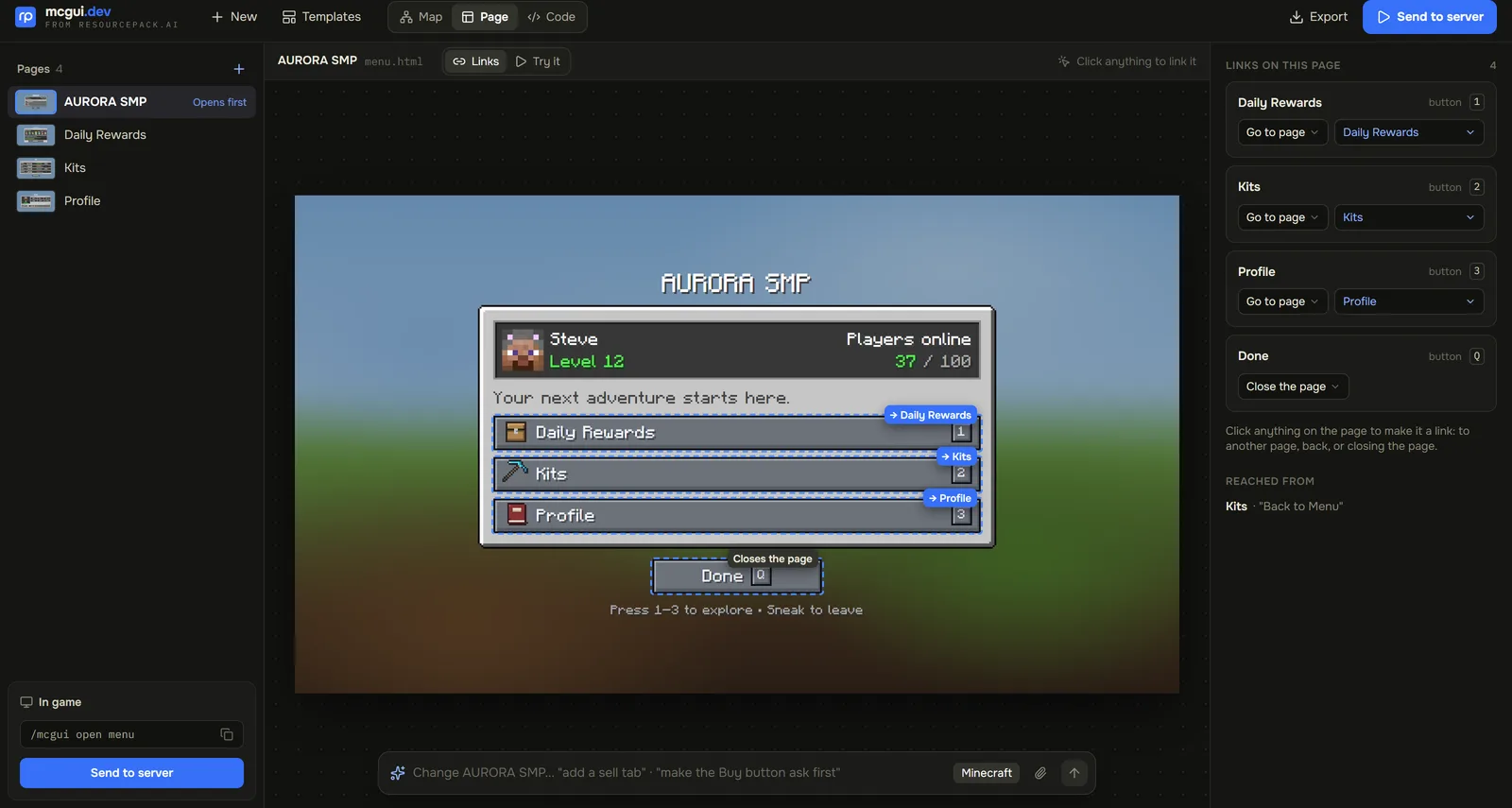
Press Send to server there and you get an eight-letter code. On the server:
/mcgui import <code>That writes the project's pages, stylesheets and pictures into the pages folder, replacing files of the same name, and tells you how to open them. Importing the same project again removes the files it no longer has, unless they were changed on the server since. Any picture a page uses as a cursor is copied into the cursors folder, and the server needs a restart before it shows.
A page made on mcgui.dev is drawn with a faint mark: some blocks of plain
colour are one shade bluer, in a pattern mcgui.dev can read back from a
screenshot. It holds nothing about the player or the server.
builder-mark: false draws every page exactly as written.
Fullscreen pages#
/mcgui open <page> sits the player down in front of the page. Their camera
locks onto it and only they see it; the rest of the world goes on around them.
| Control | Does |
|---|---|
| Mouse | Moves the pointer |
| Left or right button | Clicks |
| Wheel, or W and S | Scrolls |
| F | Goes back a page |
| Sneak | Gets up |
Any key a page gives a data-key | Clicks that element |
They are put back exactly where they stood, facing the same way. Anything that hurts them, a teleport, a world change or death also gets them up.
With the resource pack the page fills the whole window, whatever its shape and
the player's field of view, and the pointer moves as fast as their mouse.
Without the pack the page is drawn in plain map colours; such a player can run
/mcgui fov <degrees> so it fits their screen, as the server cannot read the
setting.
Size#
A fullscreen page is 16 maps by 9 by default (views.size), laid out 576 CSS
pixels tall (views.height), so at the usual window shape it is 1024 CSS pixels
wide. A page can set its own with ui:size and ui:height (page
settings).
The size is also the player's frame rate: every map on screen is drawn on its own. 16×9 is about one map pixel per screen pixel in a 1080p window. 14×8 gives about 25% more FPS with text barely softer; 12×7 or 11×6 (50 to 80% more) suit pages of big buttons and pictures. Avoid 8×5, which is stretched in a 16:9 window.
Pointer speed#
The pointer moves a fixed distance for each step the mouse reports, like a
desktop pointer, whatever the player's Minecraft sensitivity. At the default
views.pointer-speed: 1.0, crossing the page takes as much hand movement as
crossing a 1920-pixel screen at Windows' default speed. Each player can scale
theirs with /mcgui pointer <0.25 to 4>.
When a player opens a Minecraft screen over a page (chat, the inventory, the pause menu) the game frees the mouse and their own cursor shows too, until they close it. The page's pointer hides itself for the pause menu while the game's Menu Background Blur is 1 or more, which is the default.
Wall screens#
/mcgui place <page> [cols] [rows] [name] [shared]Look at the side of a block: it becomes the top-left corner. The screen is
cols maps wide and rows tall, in invisible frames only players' games know
about, so nothing in the world changes. Players point at it with their
crosshair: left-click clicks the page, the wheel scrolls it, and right-click
sits them down at that page fullscreen (walls.right-click-fullscreen).
- Each player browses their own copy of a wall's page: one player opening
a tab does not open it for everybody. Place it
sharedand everyone sees the same one; commands, messages and links still act for whoever clicked, with placeholders filled in for them. /mcgui remove [name]takes one down, or the one you look at. Screens are kept inscreens.ymland come back on restart. A screen in a world loaded later (by a multiworld plugin) goes up when that world loads.- A screen is only sent to players within
screens.view-distanceblocks (48), and can be clicked fromscreens.reach(8). - Screens showing the same page share their maps, so one page on many screens costs players about what one does. Many different pages in view is what lowers their frame rate.
Overlays#
A page with an overlay setting is drawn on nothing instead of white:
<meta name="ui:overlay" content="rgba(8, 10, 22, 0.55)">Leave html and body transparent and put the page in a panel. Fullscreen,
the player sees the world round the panel under that tint (none for no
tint). Add blur to blur the world as the game blurs it behind a menu:
<meta name="ui:overlay" content="rgba(8, 10, 22, 0.3) blur">Opening an overlay does not move the player's view at all. The world round the panel is the picture of it their game took as it opened, so it stays still while the pointer moves, and they are back exactly where they were when they close it. That needs a 1.21.11 or newer client and the pack; otherwise the world shows live round the panel. On a wall, the wall behind shows through.
market-overlay and market-blur in the examples are the market as an overlay.
In a page#
| Write | In game |
|---|---|
<a href="shop.html"> | Goes to another page in the folder; #id scrolls to it |
data-command="spawn" | Runs a command as the player |
data-console="give {player} bread" | Runs a command as the console. Not run if a filled-in value has a space or ; in it (a nickname, say), which is logged |
data-message="<gold>Hi {player}" | Sends the player a chat message, in MiniMessage |
data-action="close" | Closes the page. Also back, reload, top, page:shop |
data-close | With a command: closes the page after running it |
data-event="buy" | Nothing by itself: a plugin hears it (for developers) |
data-sound="block.note_block.pling 1 1.5" | The sound a click on it makes: <sound> [volume] [pitch], or none |
data-hover-sound="ui.button.click 0.1 2" | Plays when the pointer comes onto it |
data-key="1" | Fullscreen, pressing that key clicks it: w a s d, space, sprint, f, q, 1 to 9 (several with spaces) |
<img src="head:{player}"> | A player's face with their hat layer, crisp at any size. Any name or UUID works (head:Notch) |
href="https://..." | Sends the link to chat, where it can be clicked |
:hover, :active | Work, as the pointer moves and clicks |
<details>, checkboxes, radio buttons | Open and tick when clicked |
<select>, <input type="range">, <input type="number"> | A click picks the next option, sets the slider where it lands, or steps the number down (left half) or up (right half) |
A page's own data-key wins over what the key does by default. The wheel also
moves the hotbar, so a page can use any six of the number keys.
Players cannot type into a text box: there is no keyboard to type with.
Forms#
A submit button inside a form runs the form's command with each field's value
filled in as {form.<name>}:
<form data-command="buy {form.item} {form.amount}">
  <select name="item">
    <option value="bread">Bread</option>
    <option value="apple">Apple</option>
  </select>
  <input type="number" name="amount" value="1" min="1" max="64">
  <button type="submit">Buy</button>
  <button type="reset">Reset</button>
</form>
A form can use data-console or data-message the same way, and any
element's command can use {form.<name>} too, from the form it is in or the
whole page.
Placeholders#
Filled in for each player, in text and in attributes:
| Placeholder | Is |
|---|---|
{player} {uuid} | Their name and UUID |
{world} {x} {y} {z} | Where they are |
{online} {max} | Players online, and the most allowed |
{health} {level} | Their health and XP level |
%...% | Any PlaceholderAPI placeholder, when it is installed |
They are filled in once as the page opens. To keep them current, give the page
ui:refresh (page settings).
Page settings#
All optional, in the page's <head>:
<meta name="ui:size" content="12x7">        <!-- fullscreen size in maps (config: views.size) -->
<meta name="ui:height" content="576">       <!-- the page is laid out this many CSS px tall -->
<meta name="ui:refresh" content="5">        <!-- fill placeholders again every 5 seconds (0.5 at most often) -->
<meta name="ui:scroll-step" content="tile"> <!-- a notch of the wheel: CSS px, or "tile" for one map row -->
<meta name="ui:click-sound" content="none"> <!-- what a click that does something sounds like -->
<meta name="ui:open-sound" content="item.book.page_turn"> <!-- plays when the page opens -->
<meta name="ui:overlay" content="rgba(8, 10, 22, 0.55)"> <!-- an overlay -->Sounds#
A sound is any the game has, by its id (entity.experience_orb.pickup), or
your own: put an .ogg in plugins/MCGUI/sounds/ and restart, and it goes
into the pack named after its path. sounds/menu/open.ogg plays as
uiengine:menu/open, from a page, /playsound or any plugin. Names are lower
case. Only the player who clicked hears a page's sounds.
Cursors#
The pointer is an arrow, a hand over anything clickable, a text caret, or
nothing, as the page's CSS cursor says (default, pointer, text,
none). For one of your own, put a PNG in plugins/MCGUI/cursors/ and
restart: it goes into the pack under its file name, and a page asks for it the
way a web page does.
body     { cursor: url(arrow.png), default; }
.button  { cursor: url(hand.png) 6 0, pointer; }
.locked  { cursor: url(no.png) 8 8, default; }
The two numbers are the pixel that points, in the picture's own pixels (top left if left out). The keyword after it is what players see if the cursor is not in the pack yet. 16 pixels tall is the arrow's size; up to 32 is drawn bigger, and taller is scaled to 32.
What pages can use#
CSS: every selector and combinator, :not :is :where, :hover
:active, ::before ::after ::marker, the cascade with !important,
variables, calc() min() max() clamp(), @media, @import,
@font-face (TTF and OTF, and Google Fonts links), block and inline layout,
flexbox, grid (repeat(auto-fill, minmax()), fr, areas), tables, absolute,
fixed and relative positioning, z-index, overflow and scrolling,
border-radius, borders, box-shadow, text-shadow, linear, radial and
conic gradients, background-clip: text, background images, opacity,
transform, filter, backdrop-filter: blur(), object-fit,
text-overflow: ellipsis, -webkit-line-clamp, and animations and
transitions (@keyframes, animation, transition).
Pictures: PNG, JPEG, GIF, SVG files and inline SVG. Inside an SVG, set
fill and stroke as attributes on its tags: page CSS does not reach in.
Fonts: Inter (sans-serif and every system font name), Source Serif 4
(serif), JetBrains Mono (monospace), Minecraft (the game's own letters)
and Monocraft are built in.
Not supported: JavaScript, WOFF fonts, WebP pictures, video, iframes, floats (a floated box stays where it is), and typing into inputs.
Files are read from the pages folder only. With allow-web a page can also
load stylesheets, fonts and pictures from the web, but not from the server's
own machine or network unless allow-private-hosts is on. Pages load in the
background, so a slow one never holds up the server.
Fast pages#
Pages are drawn off the server's main thread. A hover is quick when only the part of the page that changed has to be drawn again, and quicker still when it was drawn before the pointer got there, which MC GUI does for the hovers nearest the pointer. To keep it that way:
- Animate
opacity, colours,transform,filterand shadows, notwidth,height,margin,toporfont-size, which lay the whole page out again every frame. - Keep what moves small. A spinner costs little; a whole panel that bobs is
drawn again whole every frame. A
transitionoranimationcosts nothing while it is not running, and one that repeats for ever is drawn once for everybody watching. - Avoid
:hoverwith+or~(.card:hover + .label): that stops hovers being drawn ahead. Put what changes inside the hovered element (.card:hover .label). - Blur is the costliest thing to draw. Keep
filter: blur()andbackdrop-filteroff large areas near things players hover. A blurred background box with nothing inside it is blurred once and kept. - Keep a player's own values away from what they hover. Where nothing personal is in reach, one drawing of a hover serves every player.
/mcgui stats shows what the plugin costs the server right now: its share of
each tick, how long pictures took to draw, and its threads. A picture that
takes more than render-timeout seconds of CPU (2) is given up and reported,
so one heavy page cannot hold a thread for good; raise it for very large pages.
The resource pack#
With the pack, maps show full colour, smoothly scaled, a fullscreen page fills the window and the pointer follows the mouse every frame. Without it, players still see every page, in dithered map colours.
MC GUI builds the pack at start (with your sounds and cursors in it) and,
under resource-pack:
mode | Does |
|---|---|
serve (default) | Serves pack.zip itself on port and sends it to players as they join |
external | Serves nothing: host plugins/MCGUI/pack.zip yourself, or merge it into your own pack, and set public-url |
off | No pack |
Set public-url on a real server
With public-url blank, players are told to fetch the pack from
127.0.0.1, which only works for a player on the server's own machine. Set
it to an address players can reach, such as http://play.example.com:25602/pack.zip,
and open that port.
required: true makes the pack required, so a player who declines it is
disconnected, and prompt is the line their game shows when it asks.
/mcgui pack sends it again. A restart is needed after adding sounds or
cursors, or changing anything under resource-pack.
MC GUI's pack replaces the game's text shader, as some other plugins' packs do (HUD and font plugins, mostly). If two of them reach a player, one silently loses: merge packs with care.
Commands#
/gui and /ui work as well as /mcgui, unless another plugin has them
(gui-alias: false or ui-alias: false in config.yml).
| Command | Does |
|---|---|
/mcgui open <page> [player] | Opens a page fullscreen |
/mcgui close [player] | Closes it |
/mcgui place <page> [cols] [rows] [name] [shared] | Puts a page on the wall you look at |
/mcgui remove [name] | Takes a wall screen down, or the one you look at |
/mcgui list | Every page, and where every screen is |
/mcgui reload | Reads the config and every page again |
/mcgui import <code> | Brings in pages from mcgui.dev |
/mcgui test wall|view [cols] [rows] [player] | A test picture on the wall you look at, or fullscreen |
/mcgui fov <degrees> | Fits fullscreen pages to your field of view, without the pack |
/mcgui pointer [speed] | Your pointer speed, 0.25 to 4 times the server's |
/mcgui pack | Sends you the resource pack again |
/mcgui stats | What the plugin costs the server now (stats json for one line of JSON) |
/mcgui clear | Removes every test wall |
Permissions#
Each command has its own node, so you can hand out one without the rest.
Pointing a command at another player needs that command's .others node too.
| Node | Allows | Default |
|---|---|---|
mcgui.open | /mcgui open <page> for yourself | op |
mcgui.open.others | Opening a page for somebody else; also grants mcgui.close.others | op |
mcgui.close.others | /mcgui close <player> | op |
mcgui.place | /mcgui place | op |
mcgui.remove | /mcgui remove | op |
mcgui.list | /mcgui list | op |
mcgui.reload | /mcgui reload | op |
mcgui.import | /mcgui import, which writes files into the pages folder | op |
mcgui.test | /mcgui test for yourself | op |
mcgui.test.others | /mcgui test for somebody else | op |
mcgui.stats | /mcgui stats | op |
mcgui.clear | /mcgui clear | op |
mcgui.fov | /mcgui fov | everyone |
mcgui.pointer | /mcgui pointer | everyone |
mcgui.pack | /mcgui pack | everyone |
mcgui.update | Being told in chat when a new version is out | op |
mcgui.admin | All of the above | op |
Closing your own page needs no permission, just as sneaking out of it needs
none. A page's buttons run commands as the player who clicked, so they still
need permission for those commands; data-console runs as the console and
does not.
Config#
The settings most servers touch, in plugins/MCGUI/config.yml. Every one is
explained in the file itself.
| Key | Default | Does |
|---|---|---|
pages-folder | pages | Where pages are read from |
live-reload | true | Shows a changed page within a second of saving it |
allow-web | true | Lets pages load fonts, stylesheets and pictures from the web |
views.size | 16x9 | Fullscreen size in maps, unless a page sets its own |
views.pointer-speed | 1.0 | How far the pointer moves for the mouse |
walls.right-click-fullscreen | true | Right-clicking a wall screen opens its page fullscreen |
screens.view-distance | 48 | Blocks from a wall screen beyond which it is not sent |
resource-pack.mode | serve | See The resource pack |
resource-pack.public-url | blank | The pack's address for players |
render-timeout | 2 | Seconds of CPU a picture may take before it is given up |
cpu-threads | 0 | Threads for drawing pages; 0 means the cores minus one |
builder-mark | true | Draws the mcgui.dev mark on pages made there |
telemetry | true | The anonymous usage count |
update-check | true | Asks SpigotMC for new versions |
/mcgui reload reads the config again, except the resource pack, screens and
threads, which need a restart.
For developers#
Add depend: [MCGUI] to your plugin.yml and compile against MC GUI, never
shading it: it owns the pack, the map ids and the seats, so there is one copy
on the server. It is published from its
GitHub repository through JitPack:
repositories { maven { url 'https://jitpack.io' } }
dependencies { compileOnly 'com.github.resourcepack-ai:mcgui:<tag>' }Pages#
MCGUI.open(player, "menu");   // pages/menu.html, fullscreen
MCGUI.close(player);
MCGUI.page(player);           // the page they have open, or null
MCGUI.exists("menu");
What players do on pages comes as Bukkit events: PageClickEvent
(cancellable, before a click acts, with the element's attributes and the form's
values), PageOpenEvent and PageCloseEvent. An element with a data-event
does nothing but fire the click, so a page can hand a button to your plugin:
<button data-event="buy" data-item="bread">Buy bread</button>@EventHandler
public void onClick(PageClickEvent e) {
if ("buy".equals(e.getEvent())) shop.buy(e.getPlayer(), e.getAttribute("data-item"));
}Your own pictures#
Under the pages is a framework any plugin can draw with, from anything that
makes a BufferedImage:
UIFramework engine = UIFramework.get();
Canvas canvas = engine.canvas(4, 3);               // 512 x 384 pixels
canvas.draw(image, 0, 0);                          // only changed tiles are sent again
engine.placeWall(topLeft, BlockFace.SOUTH, 4, 3, viewer -> canvas);
engine.openView(player, () -> canvas, ViewOptions.DEFAULT);
WallContent and ViewContent have default methods for looking, pointing,
clicking, scrolling, keys and chat: implement the ones you need. Every callback
runs on the server thread, and a wall can show each viewer a canvas of their
own. canvas.transparency(true) lets the world show through where a picture is
see-through, and ViewOptions.DEFAULT.blur(true) blurs it.
The examples are whole plugins built this way: an arcade of games on cabinets and fullscreen, a live world map, and pages in the game's own look.
Support#
Ask in Discord, or open an issue on GitHub. MC GUI is open source under the GPL-3.0.