
Dialogs
Punishments
An addon for Dialog Engine: a separate plugin that uses Dialog Engine to draw its screens. Unlike most addons it also works without it, as plain commands.
It is a punishment plugin whose staff tools are a real Minecraft menu.
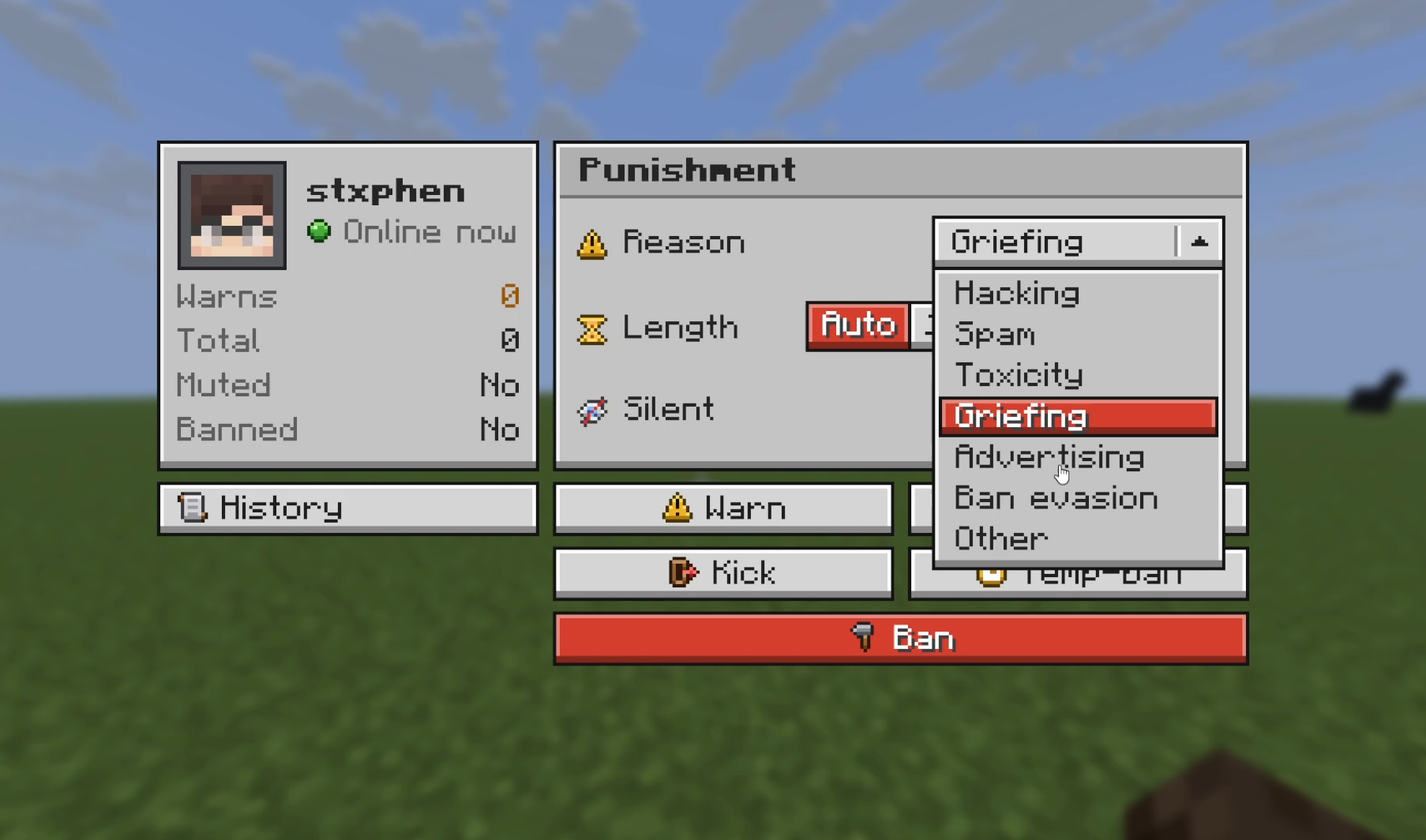
/punish Steve shows Steve's record and a button for each of warn, mute, kick,
temp-ban and ban, and every button does exactly what the matching command does.
Installing#
- 1
Install Dialog Engine for the panel
The panel is drawn by Dialog Engine 0.4.1 or newer (free). Without it, Punishments still works: every command does, only
/punishand the screens need Dialog Engine. - 2
Drop it in
Download Punishments.jar, or get it from SpigotMC, and put it in
plugins/. Then start the server. - 3
Open the panel
Its screens install themselves into Dialog Engine on the first start, in
plugins/DialogEngine/drawn/punishments/. Type/punishand a player's name.
It runs on Spigot or Paper 1.21.7 and newer, one jar for both. The panel needs players on 1.21.6 or newer (1.21.9 or newer to see players' heads). Players install nothing: Dialog Engine sends the panel's small resource pack the first time somebody opens it.
The panel#
/punish <player> opens it. /punish on its own lists who is online, and takes
a typed name for anybody who is not.
- Reason, Length and Silent are remembered per staff member, so they stay where you left them.
- Length "Auto" uses the length set for the chosen reason in
config.yml. - Unmute and Unban appear only when they apply.
- Temp-ban and Ban ask first, with a box for details that are added to the reason.
- History lists everything the player has had, each with a Revoke button.
- Every button checks the same permission as its command when it is
pressed: a helper without
punishments.bancannot ban from the panel either.
A warned player sees a popup they have to acknowledge. If they were offline, they see it the next time they join.
Commands#
| Command | What it does | Permission |
|---|---|---|
/punish [player] | The panel | punishments.punish |
/warn <player> [-s] [reason] | Warn | punishments.warn |
/unwarn <player> | Remove the newest warning | punishments.unwarn |
/mute <player> [length] [-s] [reason] | Mute | punishments.mute |
/unmute <player> | Unmute | punishments.unmute |
/kick <player> [-s] [reason] | Kick | punishments.kick |
/tempban <player> <length> [-s] [-ip] [reason] | Temp-ban | punishments.tempban |
/ban <player> [length] [-s] [-ip] [reason] | Ban, for good unless a length is given | punishments.ban |
/unban <player> | Unban | punishments.unban |
/history <player> | Their record | punishments.history |
/punishments reload | Read config.yml and messages.yml again | punishments.admin |
/punishments revoke <id> | Lift one punishment by its number | punishments.revoke |
- Lengths:
30m,2h,7d,2w,1mo,1y, combined like1d12h, orperm. Leave it out and the reason's own length is used. - Reasons: a reason starting with
#is a preset fromconfig.yml, and anything after it is details:/tempban Steve #hacking flying at spawn. -sis silent: only staff withpunishments.notifyhear about it.-ipalso bans the player's address. A local or private address (loopback,10.x,192.168.xand the like) is refused, because behind a proxy or on a LAN it is everybody's.- Everything but kick works on offline players.
Every command's name and aliases are in config.yml, and any command can be
turned off there. Punishments takes /ban, /kick and the rest over from
vanilla and other plugins.
Permissions#
Every command and option has its own node, so you can hand out exactly the ones a rank needs. All are op-only by default, except the last two.
| Node | Allows |
|---|---|
punishments.punish | /punish, the panel |
punishments.warn, .unwarn | /warn, /unwarn |
punishments.mute, .unmute | /mute, /unmute |
punishments.kick | /kick |
punishments.tempban | /tempban |
punishments.ban | /ban, permanent or with a length |
punishments.ban.ip | -ip on a ban |
punishments.unban | /unban |
punishments.history | /history |
punishments.revoke | /punishments revoke, and Revoke in the history |
punishments.notify | Hearing silent punishments and staff-only announcements |
punishments.update | Being told on joining that a newer version is out |
punishments.staff | All of the above except punishments.update |
punishments.admin | /punishments reload, and everything in punishments.staff |
punishments.exempt | Cannot be punished by players. Off by default |
punishments.limit.helper, .limit.moderator | The caps under limits: in config.yml. Off by default |
An offline player counts as exempt if they held punishments.exempt when they
were last online.
Setting it up#
plugins/Punishments/config.yml:
storage: SQLite out of the box, or MySQL/MariaDB to share one record across a network. Changing it needs a restart.reasons: the presets, each with how long a mute and a temp-ban for it last.limits: caps per staff rank, by permission. A helper might mute for a day and temp-ban for three; longer lengths are cut down, and the staff member is told.warnings: when warnings stop counting, the popup, and escalation: three warnings runs a mute, five a temp-ban, or whatever commands you write. A step only runs if the warner could have run that command themselves.mute: which commands a muted player cannot use, and whether signs and books are blocked too.broadcast: who hears about each punishment: everyone, staff or nobody.update-check: whether to ask SpigotMC for newer versions.
plugins/Punishments/messages.yml has every word, in
MiniMessage, including the
kick and ban screens and everything written on the panels.
/punishments reload reads both.
Changing the screens#
The screens are ordinary Dialog Engine drawn dialogs, so they open in its
browser editor: /de edit punishments:panel, or confirm, history,
players and warned. A screen you have edited is kept when Punishments
updates; delete its folder in plugins/DialogEngine/drawn/punishments/ to take
the new version's.
For developers#
Add depend: [Punishments] to your plugin.yml (or softdepend, and check
Punishments.isEnabled() first) and compile against the jar. The API is in
ai.resourcepack.punishments.api. Needs Punishments 0.1.3 or newer.
PunishmentsAPI punishments = Punishments.api();

// Online and muted? Answers at once, for a chat plugin.
if (punishments.isMuted(player)) return;

// Anybody, online or not. Futures complete on the main thread.
punishments.activeBan(uuid).thenAccept(ban ->
        ban.ifPresent(b -> sender.sendMessage("Banned for: " + b.reason())));
punishments.history(uuid, 20).thenAccept(rows -> rows.forEach(this::show));
punishments.warnings(uuid).thenAccept(count -> { /* the number escalation counts */ });

// Punish and lift, as if the actor had typed the command. null is the console.
long hour = 60 * 60 * 1000L;
punishments.punish(null, Punishment.Type.MUTE, "Steve", "Spamming", hour, false);
punishments.punish(null, Punishment.Type.BAN, "Steve", "#hacking", Punishment.NEVER, true);
punishments.revoke(null, Punishment.Type.MUTE, "Steve");mute(player)andisMuted(player)are for online players and answer from memory. Everything else reads the database and returns aCompletableFuture.punishgoes through everything the command does: reason presets (#hacking), the actor's limits, exemptions, the events below, the broadcast and escalation. The actor is told the outcome in chat. Only the command's own permission is skipped, because your plugin has already decided.- The length is in milliseconds.
Punishment.NEVERis for ever, and0is the default fromconfig.yml. A warning and a kick ignore it. - A
Punishmentsays what it is:type(),reason(),actorName(),created(),expires(),permanent()andinForce(now).
Three Bukkit events, all on the main thread, in
ai.resourcepack.punishments.api.event:
| Event | |
|---|---|
PunishmentPreEvent | A punishment is about to be given. Cancellable, and the reason can be changed |
PunishmentEvent | A punishment was given |
PunishmentRevokeEvent | A punishment was lifted |