
Content
Armour
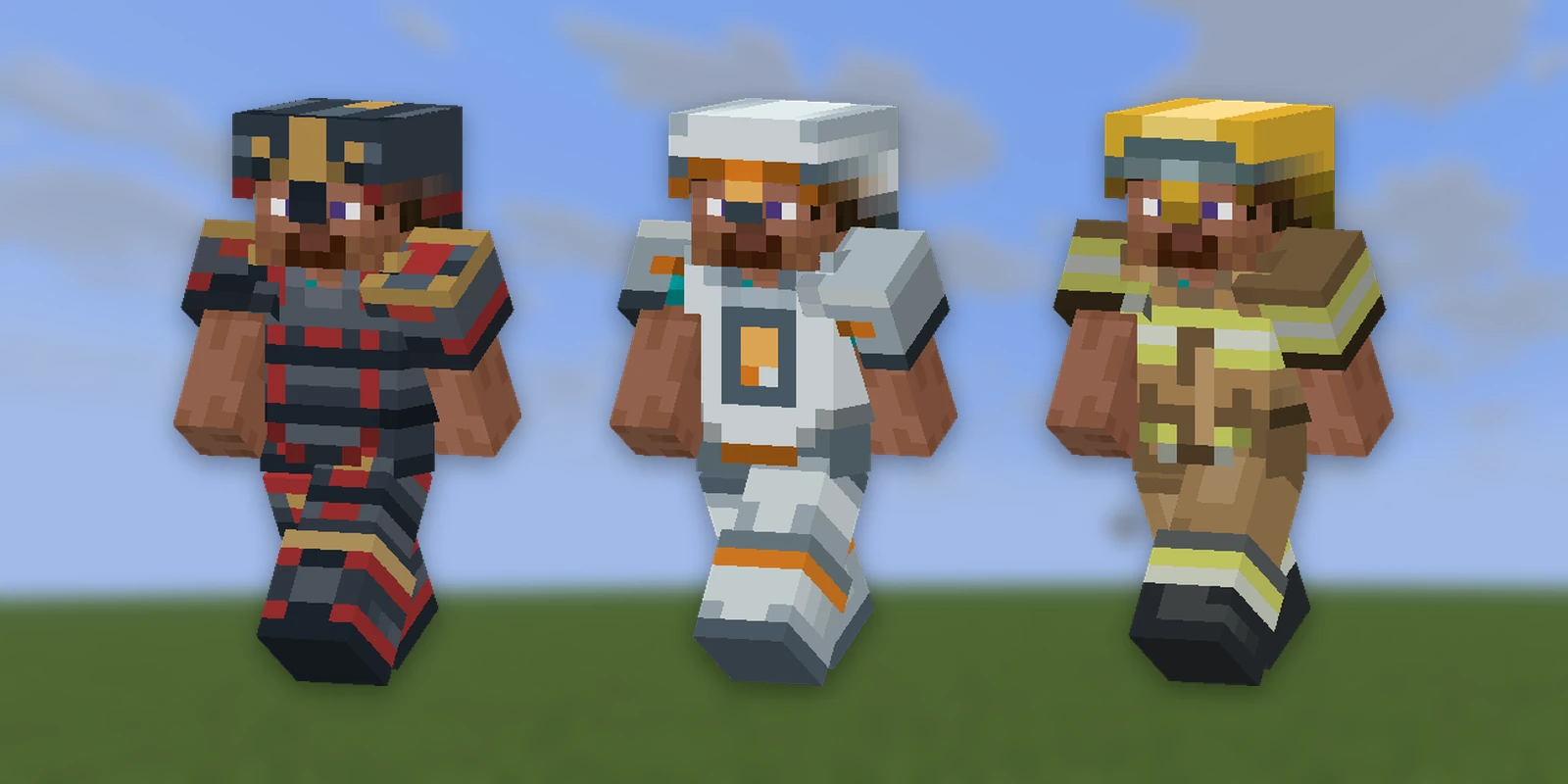
Any item can be worn as armour, with your own art drawn on the player's body. There are two kinds:
- Flat armour: a texture painted onto the player's body shape, like vanilla armour. Set up below.
- 3D armour: a set built from cubes that stands off the body (pauldrons, a tall crown). Made in Studio or in Blockbench.
Flat armour#
Add armor: to an item, saying which slot it goes in:
crown:
  material: GOLDEN_HELMET
  model: crown
  armor: head              # head | chest | legs | feet
Ship one texture, at a path that depends on the slot:
armor: legs:assets/textures/entity/equipment/humanoid_leggings/<id>.png- any other slot:
assets/textures/entity/equipment/humanoid/<id>.png
Leggings use their own, narrower sheet in the game, so art drawn for the main sheet does not line up on legs. That is why each slot asks for exactly one texture.
Using art from somewhere else#
armor-art takes a texture path under assets/textures/ (or a resource
location) and the build puts it at the right equipment path for you:
ruby_leggings:
  material: PAPER
  armor: legs
  armor-art: armour/ruby_layer_2    # assets/textures/armour/ruby_layer_2.png
An old-style armour layer sheet is exactly the picture the game wants: layer 1
for every slot except legs, layer 2 for legs. A file you put at the equipment
path yourself wins over armor-art. This is how armour from
ItemsAdder and Nexo or Oraxen
is worn without moving files.
armor-texture names an equipment texture directly instead, including
vanilla's:
crown:
  material: PAPER
  armor: head
  armor-texture: minecraft:gold   # the game's own gold armour
namespace:name means the PNG at
assets/<namespace>/textures/entity/equipment/<layer>/<name>.png.
The model and the armour are separate#
model: is what the item looks like in a hand or a chest. armor: is what it
looks like on a body. A crown can be a 3D model in your hand and a flat texture
on your head; the game draws the two separately. An item with armor: and no
model: looks like its vanilla material in the inventory and wears your art.
Needs Minecraft 1.21.4
Custom armour art uses vanilla's equipment system, which arrived in 1.21.4. On an older server the item still works, the plugin says which case you are in at startup, and each build lists the armour that will look vanilla:
- below 1.21.2, only materials that are already armour can be worn, so
armor:on a stick does nothing; - on 1.21.2 and 1.21.3, any item can be worn but shows vanilla artwork.
See Minecraft versions.
3D armour from Studio#
Flat armour is a texture on the player's body shape. A 3D armour set from Studio is built from cubes instead (pauldrons that stand off the shoulder, a crown taller than the head), and RP Engine puts it on the player. Push the pack to your server from Studio, then:
/rp armor                                     # list the sets
/rp armor wear studio:hazmat_suit [player]    # put the whole set on
/rp armor give studio:hazmat_suit [player]    # or hand over the pieces
/rp armor self                                # see your own pieces in F5
The pieces are ordinary items. Wear them however you wear armour (shift-click, drag into a slot, a dispenser) and take them off the same way.
3D armour in your content folder#
You can also make a set yourself in Blockbench and put it in armor3d/:
# armor3d/costumes.yml
santa:
  name: "Santa Suit"     # optional; the ID when left out
  model: armor_santa     # assets/models/armor_santa.bbmodel; the ID when left out
  displays: true         # optional, default true; see below
  shaders: true          # optional, default true; see below
  shader-helmet: false   # optional, default false; see below
That is the set mypack:santa. The model is a .bbmodel project built on
Blockbench's player template: feet at y = 0, 16 units to a block. It can face
either way: front toward +Z with the right arm on the −X side, or front toward
−Z with the left arm on the −X side (how the template and Bedrock armour
templates stand). RP Engine works out which from where the arms and legs are.
Put cubes in groups named after the bone they ride:
| Group | Piece |
|---|---|
head | Helmet |
body, right_arm, left_arm | Chestplate |
waist, right_leg, left_leg | Leggings |
right_foot, left_foot | Boots |
A piece with no cubes is not part of the set, so a crown alone is a one-piece
set. A group inside a bone (a cape inside body) rides that bone. A group
with any other name is a load warning. Cubes and groups can be rotated any way
you like.
Armour points and durability#
Needs RP Engine 0.2.37 or newer.
The pieces /rp armor give hands out only look like armour: they give no
armour points. To make a 3D set protect its wearer, write the pieces as
ordinary items and add armor3d: with the set's id. The
item keeps everything it already has (name, attributes, durability, recipes)
and wears that set's piece for its armor: slot:
# items/void_armour.yml
void_helmet:
  name: "&5Void Helmet"
  material: NETHERITE_HELMET
  armor: head
  armor3d: void_armour     # the set; an id in this pack, or namespace:id
  durability: 1000
  attributes:
    - armor: 5
armor: is required with it, because it says which piece of the set the item
is. armor3d: replaces armor-art:, so leave that out.
Meshes and shader helmets#
Needs RP Engine 0.2.10 or newer.
Mesh elements from Blockbench's mesh tool are read too, as quads and triangles. Triangulate any face with more than four corners, or it is left out with a warning. A mesh can be any shape (smooth surfaces, thin locks of fur), and a texel with alpha below 0.1 is cut out, so strands painted on a quad read as hair.
Only the client's shaders can draw a mesh (see below), so:
- A set with meshes wants
displays: false. Viewers shown display entities see it without its meshes. - A mesh on the head needs
shader-helmet: true. - Mesh faces are not nudged apart the way cube faces are, so keep two of them out of one plane.
- Each bone costs one armour layer per four faces, drawn every frame. A few hundred faces per bone is a lot.
shader-helmet: true hands the helmet to the shaders too, instead of the
game drawing it as a head item. It can then be anything the body can (any
turn, meshes), but a player on a version the shaders don't cover sees no
helmet at all.
How 3D armour is drawn#
- The helmet is drawn by the game, as an item on the head. It follows the
head exactly, on every client. With
shader-helmet: truethe shaders draw it instead. - On Minecraft 26.1 to 26.3, the pack's shaders draw the rest of the set as part of the player's body, so it never lags and also shows on armour stands. RP Engine checks each viewer's version (through ViaVersion when it is installed) and spawns nothing extra for these players.
- Every other viewer sees the body pieces as display entities, posed onto
the player's limbs as they walk, swing, crouch and ride. A set with
displays: falseskips these, so other versions see only the helmet. Use that when your server only admits 26.1 to 26.3.
If the pack stops loading when you add a set
The shaders need a graphics card and driver with OpenGL 4.5 and subgroup
support. A player whose computer lacks them (older integrated graphics, or a
Mac) does not just miss the armour: Minecraft rejects the whole pack and shows
"Resource reload failed". Add shaders: false to the set (RP Engine 0.2.45 or
newer) and the pack carries no shader for it, so it loads for everybody and
every player sees the display entities instead. Leave displays on when you
do: with both turned off, nobody sees more of the set than the helmet.
What to expect with display entities:
- Swimming, crawling, gliding and sleeping hide the body pieces until you stand up again.
- You do not see your own body pieces unless you turn on
/rp armor self. - Anyone who cannot see you cannot see your armour either, so vanished staff stay vanished.
- A set is roughly ten to forty entities per player wearing it. They are never saved and never collide with anything.
Needs Minecraft 1.21.4
3D armour pieces are named with a string custom_model_data, which arrived in
1.21.4. On an older server the sets still load and are checked, nothing is
built into the pack, and /rp armor says why.
On Bedrock#
Flat armour reaches Bedrock players through Geyser, drawn from the same equipment texture.
3D armour from Studio does too: the Bedrock pack carries each piece as a
Bedrock worn model. RP Engine only recognises pieces it handed out itself, so a
piece from a plain /give shows as paper on Bedrock until it is given again
with /rp armor give or /rp armor wear.