
Content
Vehicles
A vehicle is a model people can get into and drive: a car, a boat, a skateboard, a helicopter, a plane. It has up to eight seats, it stays parked where you left it (through restarts too), and anyone who right-clicks it gets in. Players drive with WASD on Paper 1.21.4 and newer.
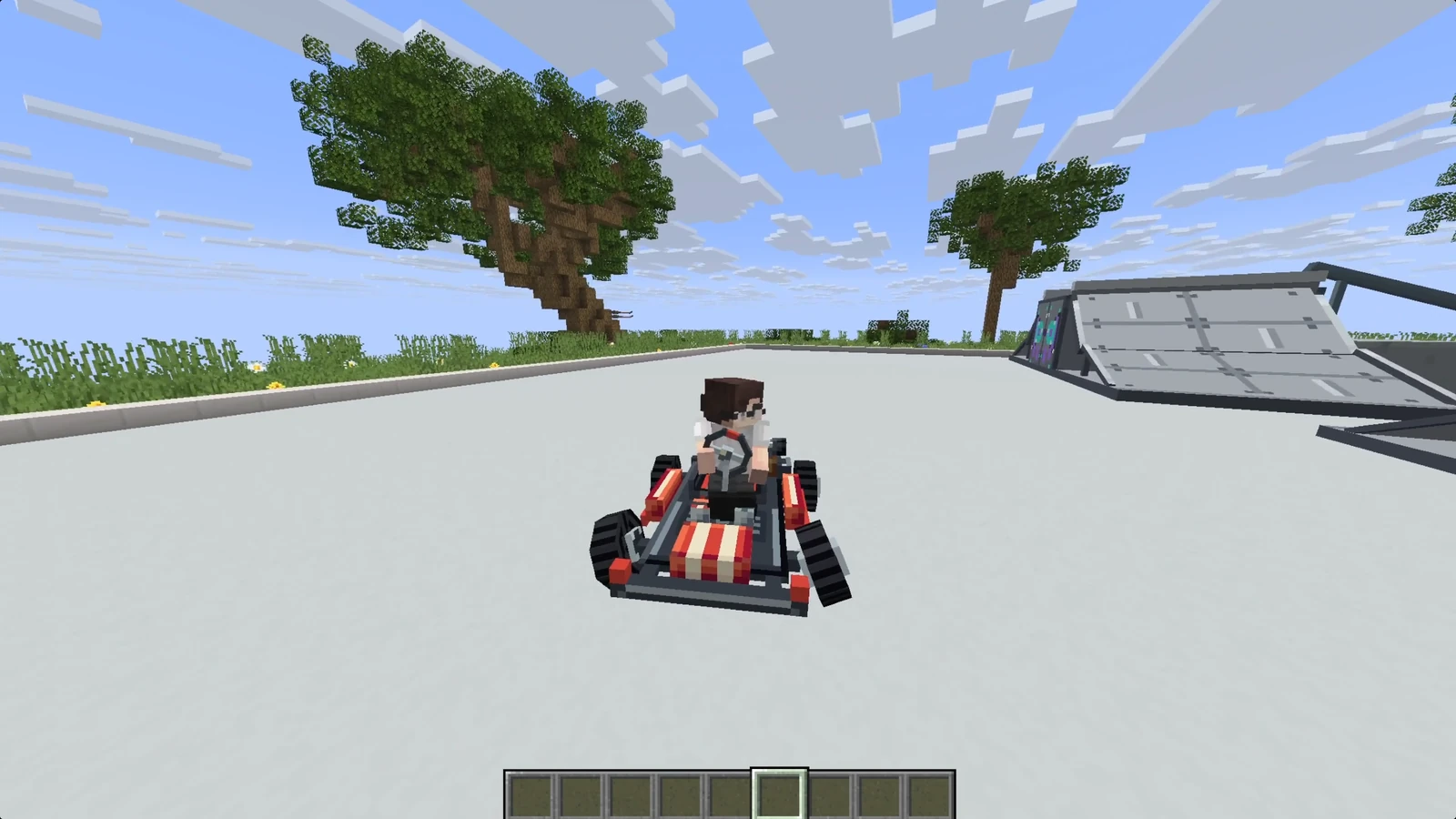
There are two ways to make one:
- In Studio: open any model, press Vehicle to make it one, place the seats in the vehicle editor and sync. Everything on this page is filled in for you.
- By hand: a file in
vehicles/in your content folder. The vehicle wears the model of an item you already have.
# vehicles/cars.yml
hatchback:
  model: mypack:hatchback_item  # an item id; the vehicle wears its model
  name: "&bHatchback"
  medium: land              # land | water | air
  speed: 18                 # top speed, blocks per second
  acceleration: 7.5         # how quickly it gets there
  turn-speed: 140           # most it swings round, degrees per second
  weight: 14                # 1-100: slower to get going, harder to shove
  hitbox:                   # what players click, in blocks
    width: 1.4              # side to side
    height: 1.2             # up from the base
    length: 3.0             # front to back
  seats:
    - {role: driver,    x: -0.4, y: 0.6, z: 0.6}
    - {role: passenger, x:  0.4, y: 0.6, z: 0.6}
    - {role: passenger, x: -0.4, y: 0.6, z: -0.5}
    - {role: passenger, x:  0.4, y: 0.6, z: -0.5}
  animations:               # optional: which animation plays when
    idle: parked
    moving: drive
  sounds:                   # optional: which sound plays when
    idle: mypack:tickover
    moving: mypack:engine
Every key except model: and one driver seat is optional. The vehicle's own
ID (hatchback here) can't be the same as the model: item's ID, which the
item already uses.
Parking and getting in#
| Command | What it does |
|---|---|
/rp vehicle <id> | Parks one where you stand |
/rp vehicle remove | Removes the nearest one |
/rp vehicles | Lists the vehicles this server has, with how many hidden seats each has |
The vehicle's item parks one too: right-click the ground holding the item
named by model: and the vehicle appears there, facing the way you face. The
item is used up (except in creative). That makes a vehicle something a shop can
sell: give a player that item (/rp give mypack:hatchback_item) and they park
it themselves.
Right-click the body to take the first free seat, driver's seat first, so
whoever gets in first drives. Right-click a particular seat to take that one.
Sneak gets out, as it does for a boat. With no hitbox: the vehicle is a
one-block cube, which is clickable but usually much smaller than it looks.
When someone gets in they are told the controls once, above their hotbar
(vehicles.mount-hint in config.yml).
Driving one#
The controls depend on the server:
| Paper 1.21.4 and newer | Anything else | |
|---|---|---|
| Speed up / slow down | W and S | Right-click speeds up a notch, left-click slows down, then reverses |
| Steer | A and D | Look where you want to go |
| Space | Handbrake (land and water) | |
| Air vehicles | Space climbs, S descends | Climb and dive with your look |
Paper is worth it here: when steering is looking, the driver can't look at anything except the road.
- S brakes before it reverses. It only engages reverse once you have stopped. In the air, S only reverses once you are back on the ground.
- Space is a drift button. Pull the handbrake in a corner and the rear lets go; ease off and get back on the power to recover. Corner harder than the tyres can hold and the car runs wide.
jump: truemakes space jump (about a block and a half) instead of braking, for a dirt bike or a skateboard. On water it pops off the surface, like a surfboard off a wave.- A vehicle only turns while it's moving, so a parked one keeps its
heading.
turn-in-place: truelets a tank, hovercraft or digger pivot on the spot. An aircraft in the air always steers. - The body follows the ground: it tilts on kerbs and slopes, dips when braking, squats under power and bounces on landing. Hills slow you going up. A wall hit at an angle scrapes you along it; one hit square stops you.
Handling reference#
| Field | Default | Range | What it does |
|---|---|---|---|
medium | land | land, water, air | Where it drives |
speed | 12 | 1 to 60 | Top speed, blocks per second |
acceleration | 6 | 0.5 to 40 | How quickly it reaches top speed |
turn-speed | 120 | 15 to 720 | The most it turns, degrees per second. Low is a lorry, high is a go-kart |
weight | 10 | 1 to 100 | Heavier is slower to start and stop, and harder to shove |
scale | 1 | 0.125 to 8 | How big the model is drawn |
jump | false | Space jumps instead of braking (land and water) | |
turn-in-place | false | Can turn while standing still | |
coast | engine's own (a car's) | How quickly it slows with nobody on the throttle, blocks per second squared | |
permission | none | A permission needed to get in. Checked when somebody gets in | |
capes | true | Draws riders' capes | |
speedometer | true | Shows the driver their speed | |
worn | false | Hides the model while somebody is in it | |
wall-ride | false | Lets it ride up a wall | |
animation-follows-speed | false | Ties animation speed to ground speed | |
hitbox | 1 × 1 × 1 | 0.25 to 16 each | width, height, length in blocks |
A number outside its range is clamped, with a line in the console.
coast matters for anything without an engine: 0.15 is a skateboard on
smooth concrete, 0.6 a bicycle, 2 a shopping trolley with a bad wheel.
Seats#
A vehicle has up to eight seats, and the order you list them is the order people fill them. The driver always goes first wherever you write it; the rest are passengers 1, 2, 3 in the order written.
| Field | What it does |
|---|---|
role | driver or passenger (the default) |
x, y, z | Right, up from the base, and forward, in blocks. They turn with the vehicle. Each is 0 if left out, and at most 8 |
yaw | Turns the occupant as they sit down, degrees clockwise from the vehicle's heading. A rear-facing bench is yaw: 180 |
pose | sitting (default): the point is where their backside goes. standing: where their feet go. About a metre apart |
name | What the seat is called when somebody takes it |
hidden | true draws nobody in the seat |
animations | What the occupant's body does, per state. See What the occupant does |
    - {role: passenger, x: 0, y: 1.2, z: -1.4, pose: standing, yaw: 180, name: "Gunner"}
    - {role: driver, y: 0.9, hidden: true}
A vehicle with no driver seat doesn't load, and the console names the file. If you write two, the first drives and the rest carry passengers.
hidden: true is for a model with its rider built in, like an enclosed cockpit
or a tank. The occupant disappears from every screen, their own included. If
F5 shows a see-through copy of them, a scoreboard team has
canSeeFriendlyInvisibles on (most tab-list plugins do this). The console
names the team once.
Bigger than three blocks#
A block model can't be more than three blocks long on any axis. scale gets
past that: a 3-block hull at scale: 4 is twelve blocks long. Seats and
particle emitters move with the model.
scale does not change the hitbox (so raise that yourself, or players click
a box the size of the original) or any handling number.
Water and air#
medium: water is a hull. On land it crawls at about a seventh of its top
speed, enough to get back off a beach. A vehicle that isn't a hull can drive
through a shallow ford, but deep water floods it: it wallows to a stop and
sinks.
medium: air on its own is a helicopter: it lifts straight up, holds its
height and never falls. Add a flight: block to make an aeroplane:
cessna:
  model: mypack:cessna_item
  medium: air
  speed: 30
  acceleration: 8
  flight:
    takeoff-speed: 12     # won't climb below this, blocks per second (max 40)
    climb-rate: 7         # how fast space gains height (max 30)
    dive-rate: 14         # how fast S loses it (max 40)
    stall-sink: 6         # how fast it sinks when too slow (max 30)
  seats:
    - {role: driver, y: 0.9}
Below takeoff-speed the climb key does nothing, so the plane needs a runway.
Drop below it in flight and it stalls, sinking at stall-sink until you speed
up or land. takeoff-speed: 0 is a helicopter again. The runway length comes
from takeoff-speed and acceleration together: 12 at 8 is about a second and
a half, roughly nine blocks. A dive keeps its speed.
A flight: block on a land or water vehicle does nothing, and a
takeoff-speed above speed means it can never take off. The console warns
about both.
States#
At any moment a vehicle is in one or more of these states. A car coming off a
kerb mid-corner is airborne, turning and moving at once.
| State | When |
|---|---|
airborne | Off the ground with nothing holding it up: a jump, a fall, or an aircraft in flight |
turning | Actually swinging round faster than a nudge (not just steering) |
reversing | Travelling backwards |
moving | Travelling forwards |
idle | Stationary, or near enough |
submerged | Its base is in water |
The order matters: for animations and sounds, the highest state in this table wins.
Animations#
animations: maps a state to one of the model's own animations. Only one
plays at a time, picked from the highest active state. A state you leave out
falls through to the next one down, so this is a complete vehicle:
  animations:
    idle: parked
    moving: drive
Cornering plays drive, because turning falls through to moving. Only
write turning: if you have drawn a lean.
idleis where the fall-through stops. Leave it blank and a vehicle standing still plays nothing.- A moored boat is
idle, notsubmerged. Put its resting animation onidle.submergedonly plays when the states above it are blank. - An animation loops for as long as its state holds, even one authored as a one-shot.
- If you map both
movingandreversing, draw them as the same cycle in opposite directions (a wheel turning 0 to 360, then 360 to 0). The engine carries the wheel's position across when direction changes. The two can be different lengths.
A wheel should turn because the vehicle moved#
By default an animation plays at the speed it was drawn, so wheels spin at the same rate whether you're crawling or flat out. Turn this on and the ground speed drives it instead:
animation-follows-speed: trueAt top speed it plays at the drawn rate, at half speed half as fast, and
standing still it holds its frame. It's off by default because not everything
on moving is a wheel: a flapping flag or a bobbing suspension usually wants
its own pace.
Steering#
There's one turning state for turning either way, so an animation on it can
only steer one way. For front wheels that follow the steering, name an
animation as steering (RP Engine 0.2.49 and newer):
steering: steerIt's never played. Draw it with the wheels at full lock to the left at its start, straight ahead in the middle and full lock to the right at its end, and RP Engine holds it at the angle the front wheels are really at. Full lock is 38 degrees, a little less at speed, so draw it at 38 degrees either side.
It sits on top of whatever else is playing and only moves the parts it
animates, so a wheel that spins on moving keeps spinning while it steers.
Sounds#
sounds: maps the same states to sound ids and follows
the animation rules: one at a time, highest state first, blanks fall through.
A vehicle with only a moving sound keeps it through corners and goes quiet
when it stops.
  sounds:
    idle: mypack:tickover
    moving: mypack:engine
The engine replays the sound each time it ends, so it loops for as long as the
state lasts. It knows how long the file runs by reading it, or from length:
if you give one. It plays from the vehicle and follows it, which takes a
mono file: a stereo one is heard at full volume everywhere in range, and
the console warns about it. A sound id the server doesn't have is silent
rather than an error.
What the occupant does#
A seat can make its occupant's body do something per state. The values are emote ids:
  seats:
    - role: driver
      y: 0.6
      animations:
        idle: mypack:lean-on-door
        moving: mypack:steering
Seats don't fall through like the bodywork does. A state you leave out gets
the seat's own stance (legs out for sitting, at rest for standing), so a
driver doesn't keep steering while parked. The one exception is turning: if
it's blank, the state underneath it is used, so the pose doesn't flicker on
every corner. An emote is worn over the stance, so one that only moves the
arms keeps the legs seated.
submerged never fires on a seat, because a vehicle is always moving,
reversing or idle. For a rowing boat, put the rest pose on idle and the
rowing on moving.
When a rider shows as themselves
Posing a rider needs the pack to carry a rig for that player. Without one,
or if they were already doing an emote of their own, they ride as
themselves and the console says why, once. Set vehicles.seat-rig: false in
config.yml to draw plain players in seats that
name no emote.
Rider options#
capes: falsehides riders' capes in this vehicle. Use it for anything you sit inside (a cabin, cockpit or tank), where a cape hangs through the bodywork. The rider stays visible.worn: truehides the vehicle's model while somebody is in it, for things worn on the body like rollerskates or a jetpack. The seat's emotes carry the art as props on the rider's legs instead. Empty, it's drawn normally.permission:is checked when somebody gets in, so it works however they got hold of the item.
The speedometer#
The driver sees their speed above the hotbar in km/h, yellow while the tyres
are sliding. speedometer: false turns it off for one vehicle (a skateboard
or a horse has no dashboard), and vehicles.speedometer: false in
config.yml turns it off for all of them. Nothing
replaces it.
Tricks: wall rides and bails#
Both are off unless you ask, and both are for things that are ridden rather than driven.
  wall-ride: true
  bail:
    from: 50          # degrees off the direction of travel
    to: 130
    min-speed: 3.0    # slower than this is a stumble, not a fall
    damage: 1.0       # half a heart; 0 for none
Wall ride: jump at a wall fast and shallow enough while holding jump, and the vehicle sticks to it, steering up and down it while you hold the key. Letting go kicks you off.
Bail: land between from and to degrees off the way you were going, at
min-speed or faster, and the rider comes off. Landing straight, or straight
backwards, is fine. bail: true uses the numbers above.
Particles#
particles: is a list of emitters, spots on the bodywork that throw a particle
while the vehicle is in any of the listed states.
  particles:
    - effect: smoke           # a particle name
      states: [moving, reversing]
      x: 0                    # same frame as a seat: right, up, forward
      y: 0.3
      z: -1.5
      count: 2                # per burst, 1 to 16 (default 1)
      interval: 2             # ticks between bursts (default 1, every tick)
      spread: 0.1             # how far they scatter, blocks (default 0)
      speed: 0.02             # how fast they drift (default 0)
      enabled: true           # false keeps it but stops it firing
    - effect: dust            # the one effect that takes a colour
      states: [idle]
      y: 1.2
      color: "#ff8800"
      size: 1
An emitter with no states never fires (the console says so). Old and new
particle names both work (SMOKE_NORMAL or SMOKE, REDSTONE or DUST).
Names that need a block or item (block, item, falling_dust) aren't
supported and are skipped with a console line. Every particle is drawn by
every player nearby, so keep count and interval modest.
Limits and server settings#
- Vehicles collide with each other, using their hitboxes and
weight, so a lorry shunts a hatchback aside.vehicles.collide: falseturns that off. - They pass through players and push mobs.
vehicles.push-players: truemakes them push players too. - The hitbox isn't solid to the game. It decides what you click, what stops the vehicle and where other vehicles hit it, but arrows, minecarts and players walking into it pass through.
- Above about 20 blocks a second, passengers lag behind the vehicle on their own screens. The driver is fine. Test anything faster before you ship it.
- If seats sit a little off from where the editor showed them, adjust
vehicles.seat-offset(up) andvehicles.seat-forward(along) in config.yml, then/rp reload.
armor-stands-tick: false stops every vehicle
With that Paper setting no vehicle moves. The engine warns about it in the console.
For plugin developers#
Fuel, ownership, speed limits and no-vehicle zones are your plugin's job. The Plugin API gives you:
- Who is in what:
driver(),occupants(),seat(),eject(). - Switching off and limiting:
setEnabled(false),setSpeedLimit(),stop(). - Pushing it about:
nudge()(a kick along its heading),spin(),applyImpulse()(also lifts a vehicle off the ground, from RP Engine 0.2.45). - Reading and faking the controls:
input()is what the driver is pressing.drive(keys)drives it as if somebody held those keys, andcarry(entity, seat)sits a non-player figure in a seat, so a plugin can run bot racers (RP Engine 0.2.50). - Tricks and parts:
perform()plays a one-off animation,detachPart()throws a named part off,wallRiding()says whether it is on a wall. - Events for getting in and out, moving, state changes, crashes
(
VehicleImpactEvent) and bails (VehicleBailEvent, cancellable).
Addons can keep their own settings on a vehicle under an addons: key. The
engine carries it through Studio syncs and /rp edit untouched; see the
addon's own page for what goes in it.