
Content
Icons
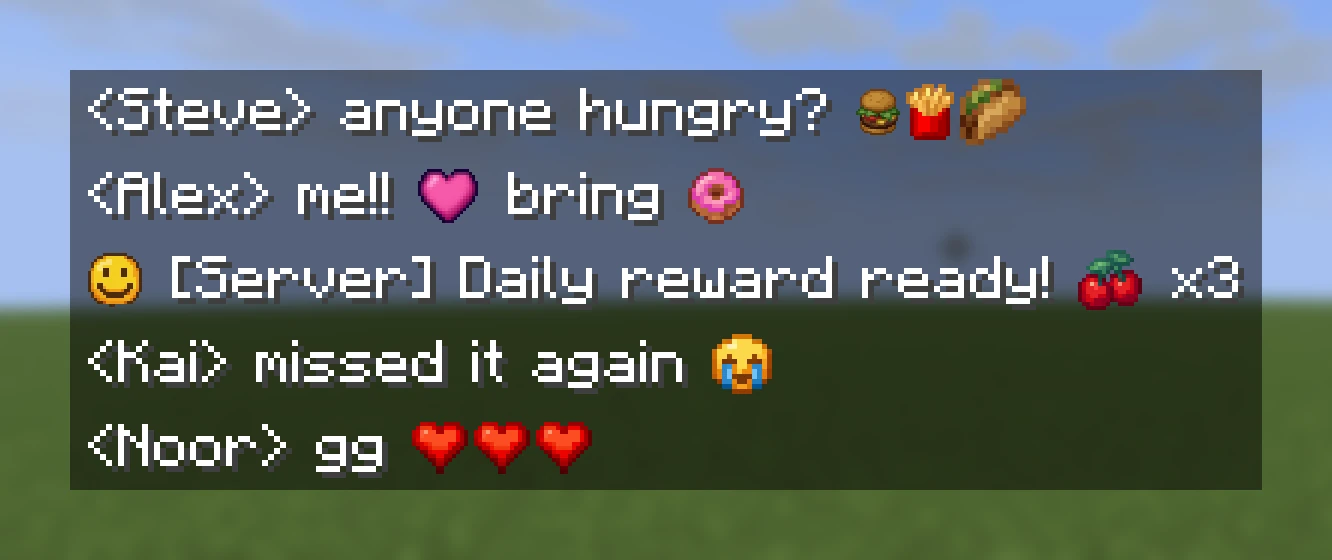
An icon is a small picture that behaves like a letter. You can put it in chat, on a sign, in an item's name, on a scoreboard or a boss bar, in a menu title: anywhere the game draws text.
# fonts/icons.yml
sword:
  file: sword     # assets/textures/font/sword.png. Defaults to the id
  height: 10
  ascent: 8
The YAML goes in a fonts/ folder of your content folder
(here mypack), and the PNG in its assets/textures/font/. After /rp reload,
put the icon into any text with :mypack:sword:. By the time the text reaches
the player it's an ordinary character, so other plugins can show it without
knowing about RP Engine.
Rank Tags
For the badge in front of a player's name, a rank tag is an icon drawn from its words and colours, with no picture to make.
Height and ascent#
| Field | Default | What it does |
|---|---|---|
height | 8 | How tall it's drawn, in pixels (8 is a capital letter). 1 to 256 |
ascent | height, at most 8 | How far above the text baseline it sits |
An ascent equal to the height puts the icon's bottom on the line. Smaller drops
it, larger lifts it. The ascent can't be more than the height (the game refuses
to draw it), so a bigger value is capped with a warning. To sit an icon in a
line of chat, start with height: 8, ascent: 7 and adjust.
A sheet of icons#
Several icons can share one PNG of equal cells, each naming its cell:
smile:
  file: emotes                            # assets/textures/font/emotes.png
  grid: { rows: 2, columns: 4, cell: 3 }  # cells count from 1, left to right, then down
  height: 8
  ascent: 7
height and ascent are the cell's, not the sheet's. The PNG's width must
divide by the columns and its height by the rows.
A file with a namespace points at that namespace's textures:
minecraft:font/image/emojis is assets/minecraft/textures/font/image/emojis.png.
Store the ID, never the character#
Characters move
Icons are given characters in ID order, so adding one can shift the ones
after it. Anything that writes :mypack:sword: and resolves it as it goes is
fine. Anything that saved the character itself (in a config file, a database,
a sign or a book) shows a different picture after the next reload.
/rp icons shows the character each icon became, for debugging, not for
copying into configs.
You don't need your own assets/minecraft/font/default.json: RP Engine builds
that file from every pack's icons. If a pack does have one (a resource pack
dropped into content/, or a Studio pack), its characters are kept and RP
Engine's icons are given other ones, so both draw.
Using them#
/rp icons                   every icon, with its character
/rp say :mypack:sword: hi   send yourself text with icons filled in
Any plugin that runs its text through RP Engine's API can take shortcodes too. See the plugin API. A shortcode that names no icon is left exactly as written, so typos stay visible.
Typing them in chat#
Turn it on in config.yml:
chat:
  icons: true
Then anybody with rpengine.chat.icons can type :wave: for the icon called
wave, or :mypack:wave: if two packs use the name. It's off by default.
Anything that isn't an icon is left as typed, so 10:30, :) and links are
safe. See Configuration.
More ways to type one, and who may#
heart:
  file: heart
  aliases: ["<3", ":love:"]       # also typed as these
permission: mypack.icon.heart # who may type it, by an alias or by :heart:- An alias only matches as a word on its own, with a space or the end of the
line on both sides.
<3becomes a heart inI <3 you, but not in<33,a<3or<3!. Aliases can't contain spaces. If two icons claim the same alias, the first by ID keeps it and the console says so. permissionis needed as well asrpengine.chat.icons. Without it, the player's text goes out as typed.
Both only apply to typing in chat. Text your plugin sends through the API
always takes :namespace:id: and ignores them.
Animated icons#
An icon can have frames. Draw them as a strip, stacked top to bottom, all the same size:
loading:
  file: loading            # assets/textures/font/loading.png, 8 frames tall
  height: 9
  ascent: 8
  animation:
    frames: 8              # the PNG's height must divide by this
    fps: 10                # default 10; 1 to 20
    loop: true             # default true
Or use a GIF, and the build makes the strip for you:
dance:
  gif: dance.gif           # assets/textures/font/dance.gif
  height: 11
  ascent: 9
A GIF plays at its own speed unless animation.fps says otherwise, and
animation.frames can keep just the first few frames. Players download the
generated strip (dance.gif.png), not the GIF.
| Limit | |
|---|---|
| 64 frames | Every frame uses a character, out of 6,400 shared by icons, screens and HUDs. A longer GIF keeps its first 64 |
| 20 fps | Once per game tick |
| 256 pixels a side | Larger GIF frames are scaled down, with a warning |
animation: works with a strip or a GIF, not a grid: sheet.
Where it moves, and where it does not#
The server animates an icon by sending the next frame, so an icon only moves in text that keeps being re-sent:
- a scoreboard, tab list, hologram or menu showing
%rpengine_icon_mypack:dance%through PlaceholderAPI, at that plugin's refresh rate; - a plugin's own text, redrawn through the API.
Anything sent once (chat, item names, signs, books, dialogs, /rp say) shows
the first frame and stays on it. (Animating in the player's own game would mean
replacing their text shader, which would clash with other packs that use it.)
If frames are different widths, the text after the icon shifts as it plays. To avoid that, give every frame a pixel in the far right column (the faintest alpha you can save is enough).
loop: false plays once and stays on the last frame, timed from when the
server started, so most people only see the last frame. Use it for an icon
that should settle, like a bar that ends full.
Coming from Nexo or Oraxen#
Their glyph files load as they are from glyphs/. See
Moving from Nexo and Oraxen.