
Content
VFX
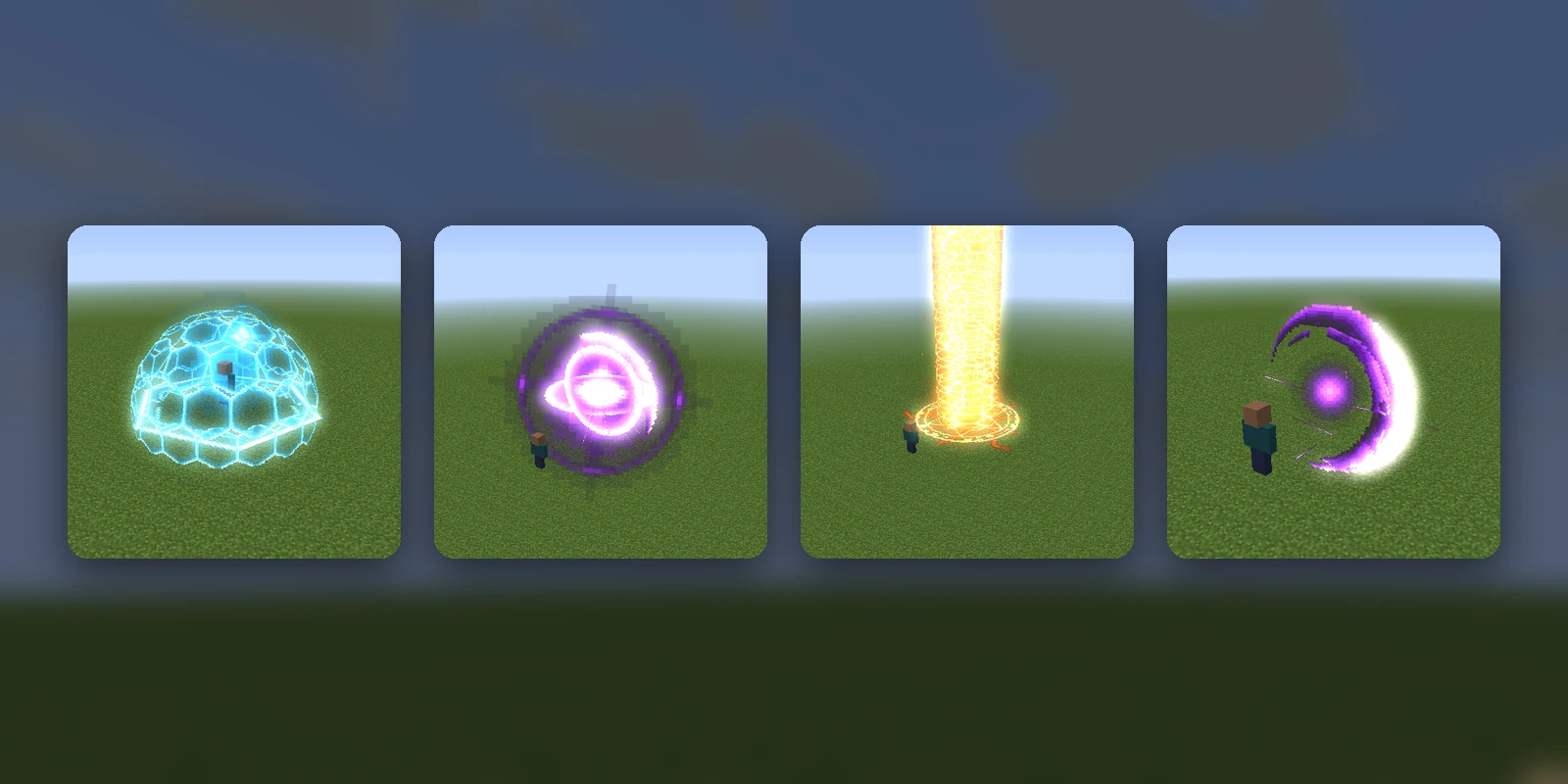
A VFX is a spell or ability effect drawn in the world: a sword slash, a ring of ice spikes, a lightning storm, a black hole. RP Engine plays it where a player stands, facing the way they face, out of glowing sprites it moves tick by tick.
# mypack/vfx/spells.yml
frost:
  preset: frost_nova
/rp cast frostThat is all it takes. RP Engine paints the sprites the effect needs into the
server's pack, and /rp cast plays it. It needs Minecraft 1.21.4 or newer
and RP Engine 0.2.20 or newer.
Three ways to write one#
# mypack/vfx/spells.yml
frost:
  preset: frost_nova          # one of the ready-made ones: /rp vfx presets
  name: Frost Nova            # what /rp vfx calls it; the preset's name if absent

burst:
  file: mypack/vfx/burst.json # Studio's JSON for one; the path is from the content folder

spark:
  recipe:                     # the same JSON, written inline
    duration: 30
    layers:
      - type: motes
        kind: streak
        start: 0
        end: 20
        burst: 40
        at: [0, 1, 0]
        shape: sphere
        speed: [0.3, 0.6]
A .json file in vfx/ that is a recipe on its own is one effect too, named
after the file: download a VFX's recipe from its page in Studio, drop it in
vfx/, and /rp reload.
The ten presets are Studio's own: void_slash, frost_nova, thunderstorm,
pillar_of_light, black_hole, starfall, sanctuary_bloom, rift_eye,
tornado and aegis_dome.
A recipe is cleaned the way Studio cleans one. Numbers out of range are clamped, fields nobody reads are dropped and a layer that cannot be drawn is left out, and the reload says what changed. So an effect plays in game exactly as it plays in Studio's preview, and a recipe with nothing left in it is refused rather than played as nothing.
From Studio#
A VFX made in Studio needs nothing on the server. Sync the pack and its VFX
arrive with it, as studio:<id>: /rp cast studio:ice_spikes, or the Play in
game button on the VFX's own page.
A Studio effect is shown only to the players whose pack has it. Somebody who has not synced sees nothing, rather than a cloud of missing-texture cubes.
Commands#
| Command | What it does | Permission |
|---|---|---|
/rp vfx | Every VFX this server can play | rpengine.vfx |
/rp vfx presets | The ready-made ones a content file can name | rpengine.vfx |
/rp cast <name> [player] [options] | Play one where a player stands | rpengine.cast |
/rp cast stop [all] | End every VFX playing, at once | rpengine.cast |
/rp cast stop <player> | End the VFX cast on a player | rpengine.cast |
/rp cast stop tag:<name> | End the VFX cast with that tag | rpengine.cast |
A bare name is a content folder's effect before a Studio one; mypack:frost and
studio:frost choose. Casting on somebody else needs rpengine.cast.others.
Stopping a loop by player or tag lets it play its fade first (see end: below);
/rp cast stop ends everything there and then.
Casting options#
Anything after the player is an option, in any order:
/rp cast storm Steve loop until:{arena_state} == "ended"
/rp cast aura Steve loop:5m follow scale:1.5 tag:aura
/rp cast frost_nova Steve speed:0.5 offset:0,0,3 only:caster| Option | What it does |
|---|---|
loop | Plays on a loop until it is stopped, or until one of the next three says |
loop:<time> | Loops for that long: 30s, 5m, 100t (ticks) |
loop:<n>x | Loops that many times: loop:3x |
until:<condition> | Loops until the condition holds. Takes the rest of the line, so put it last |
while:<condition> | Loops for as long as the condition holds. Also last |
check:<time> | How often a condition is checked: every second by default, check:5t for a quarter of a second |
end:finish / end:cut | When a loop is told to stop, play out its fade (the default) or end there and then |
speed:<n> | Playback speed, 0.1 to 10: speed:0.5 is half speed |
scale:<n> | Size, 0.1 to 10: distances and sprites both grow |
turn:<degrees> | Turns it to the left of the way the player faces; negative turns right |
offset:<left>,<up>,<ahead> | Moves it from the player's feet, in blocks: offset:0,0,3 is three blocks ahead |
follow | Moves and turns with the player for as long as it plays |
delay:<time> | Waits before it starts |
vary | Each pass of a loop draws its own random sparks instead of repeating the last |
seed:<n> | Starts its random draws from this number; the same seed plays the same way |
quiet | Plays without its sounds |
volume:<n> | Multiplies its sounds' volume, 0 to 4 |
only:caster | Only the player it is cast on sees and hears it |
tag:<name> | A name to stop it by: /rp cast stop tag:<name> |
A condition is the language dialogs use for Show when, read for the player
it was cast on: any placeholder ({health}, {world}, PlaceholderAPI's, a
value a plugin set), compared with ==, !=, <, >, <= or >=, joined
with && and ||, ! for not, brackets, and perm:<node> for a permission.
Quote words: {arena_state} == "ended". until:{health} < 6 || !perm:mage.aura
ends the loop when they are hurt or lose the permission.
How a loop goes round depends on the effect. One with a loop section (made
in Studio) plays its build-up once, repeats the section, and plays its fade when
it stops. One without plays the whole effect again each time. A loop stops on
whichever of its time, count, condition or a /rp cast stop comes first.
A loop that follows a player ends when they leave or change world.
What it costs#
Every sprite is an item display. A small effect (a slash) is a few dozen at its busiest, a big one (a dome, a storm) a couple of hundred. An effect stops starting new sparks and debris once it has 240 sprites alive, but its fixed layers are not held to that, so a very large recipe can draw more. The server-wide limit below counts every sprite either way.
vfx.max-sprites in config.yml is how many may be alive across the whole
server, 4,000 by default. When a new effect would go over it, the oldest
effects playing end to make room, so a cast always plays. 0 is no limit, and /rp reload reads a new value.
vfx:
  max-sprites: 4000   # 0 for no limit
What sprites cost the server, measured on a desktop PC running Paper 1.21.11 with one player watching. A tick has 50 ms before the server falls behind:
| Sprites alive | Average tick | Worst tick |
|---|---|---|
| 240 (one big effect) | 2 ms | 3 ms |
| 2,000 | 3 ms | 14 ms |
| 4,000 | 6 ms | 16 ms |
| 8,000 | 10 ms | 27 ms |
| 15,000 | 21 ms | 54 ms |
| 30,000 | 37 ms | 117 ms |
So the server copes comfortably up to about 8,000, starts to stutter around 15,000 (single ticks over 50 ms), and lags throughout past 30,000. Everything else your server does comes out of the same 50 ms, and every player watching is sent every sprite's movement, so a busy server or a crowd reaches these sooner.
The players' games are usually the limit before the server is. Each sprite is drawn by every client that can see it, and a few thousand on screen at once costs frames on a modest PC.
What we recommend:
- 4,000, the default, for most servers: about 16 of the biggest effects at once, or a hundred small ones, and a few ms of tick time.
- 1,500 to 2,000 for a busy survival server or one where players cast often (a PvP or RPG server), so effects never compete with everything else.
- 8,000 for a showcase or minigame where effects are the point and the server is otherwise quiet. Going above that is rarely worth it.
Nothing is saved: the displays are gone when the effect ends, and a restart mid-effect leaves nothing behind.
Every sound an effect starts is stopped when it ends, so a long one (an elytra's wind under a tornado) does not carry on into the next.
From a plugin#
engine.vfx() lists them and plays one at a place or on a player, with every
option above as a VfxOptions, plus a check of your own to end a loop. See the
API.