
Content
Scoreboards
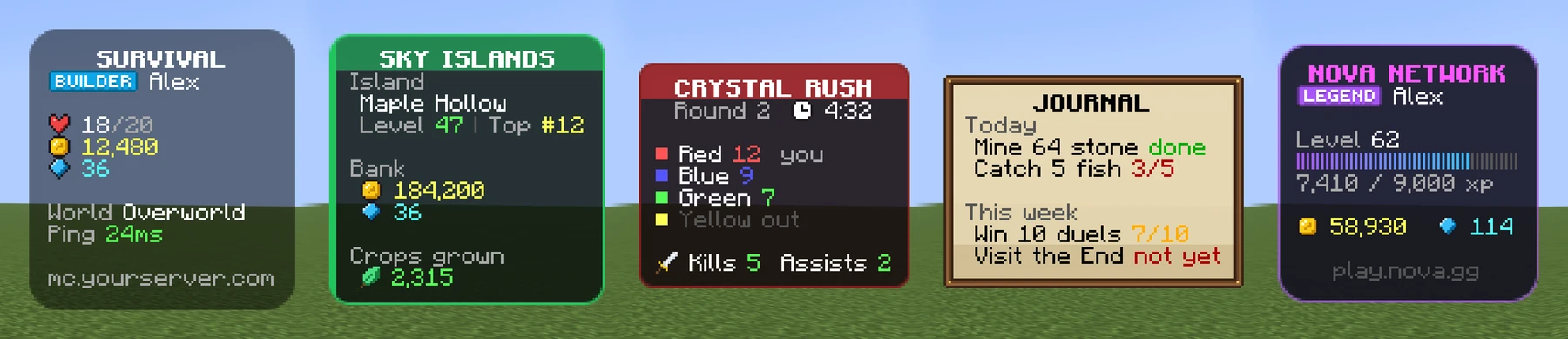
A scoreboard is the sidebar on the right of the screen. Write its title and lines in YAML, put your icons and rank tags in them, and give it a background of your own in place of the game's gray box. There is no other plugin to install.
# scoreboards/main.yml
main:
  title: "&a&lSURVIVAL"
  lines:
    - "%rpengine_tag% &f{name}"
    - ""
    - "&7Balance"
    - ":mypack:coin: &e%vault_eco_balance%"
    - ""
    - "&7Players online"
    - "&f{online}&7/{max_online}"
    - ""
    - { text: "&8play.example.com", align: center }
  background:
    color: "#10121a"
    opacity: 78
    radius: 8
Save it, run /rp reload, and every player sees it.
| Field | Default | What it does |
|---|---|---|
title | none | The line at the top, centered |
lines | required | Up to 15 lines, top to bottom. An empty one is a gap |
background | none | The panel behind it. Leave it out for the game's own gray box. See The background |
update | 20 | How often each player's is filled in again, in ticks (1 to 1200). 20 is once a second |
width | 0 | The narrowest the text may be, in pixels. Stops the panel changing size as a number grows |
worlds | every world | The worlds it shows in |
permission | none | A permission a player needs to see it |
priority | 0 | Where a player could see several, the higher one shows. A tie goes to the id that sorts first |
auto | true | false shows it only when a command or plugin does |
What a line can hold#
A line is ordinary text, filled in for each player:
| Write | To get |
|---|---|
&c, &l, &#fa4943 | Colors and styles |
<red>, <bold>, <gradient:#9055FF:#13E2DA> | The same, as tags, and gradients |
:mypack:coin: | An icon or a rank tag |
<fx:fire> | A Text Effect |
{name}, {world}, {online}, {ping} | The built-in placeholders |
%vault_eco_balance% | Any PlaceholderAPI placeholder, when the server has it |
{coins} | A value a plugin publishes for the player. See From a plugin |
%rpengine_tag% prints the rank tag a player wears, so one line shows
everybody their own.
A line sits on the left. To put one in the middle or on the right, write it
with align:
lines:
  - "On the left"
  - { text: "In the middle", align: center }
  - { text: "On the right", align: right }
An animated icon moves at the scoreboard's update rate. For a smooth one,
set update: 2.
The background#
background: draws a panel behind the scoreboard and hides the red numbers
down its right. Every part is optional:
background:
  color: "#0e1116"
  opacity: 82              # percent
  radius: 8                # rounded corners, 0 to 16
  padding: [6, 8, 7, 9]    # top, right, bottom, left. Or one number for all four
  border: "#3b82f6"        # an outline
  header: "#1d4ed8"        # a band behind the title
stripe: "#3b82f6" # a stripe down the left edge| Field | Default | What it does |
|---|---|---|
color | #10121a | The panel's color. #rrggbbaa sets its opacity too |
opacity | 78 | How solid it is, 0 to 100 |
radius | 3 | How round the corners are, in pixels, up to 16. 0 is square. The curve is smoothed, so a big one stays round |
padding | 5 | The room between the panel's edge and the text, in pixels |
border | none | An outline in this color. border-width (1) and border-opacity (100) adjust it |
header | none | A band of this color behind the title. header-opacity adjusts it |
stripe | none | A stripe of this color down the left edge. stripe-width (2) and stripe-opacity (100) adjust it |
background: true is the default panel, and background: "#1a1020" is the
default panel in that color.
The game's gray box, rounded#
To keep Minecraft's own look and only round the corners, use black at half opacity. No picture is needed:
background:
  color: "#000000"
  opacity: 50
  radius: 12
  padding: 8
A bigger radius wants more padding, or the title sits in the curve. The
panel always keeps at least six tenths of the radius clear above and below the
text, so a big radius makes it a little taller.
Keep opacity at 46 or more. Below that the panel is lighter than the game's
own box, which then shows through behind the title.
Your own picture#
Draw the panel yourself and name it with texture. It is cut into nine
pieces: the corners are kept as drawn and the edges and middle are stretched,
so one small PNG fits a scoreboard of any size.
quests:
  title: "&6&lQUESTS"
  lines:
    - "&fDaily"
    - " &7Mine 64 stone &a✔"
  background:
    texture: board         # assets/textures/gui/board.png
    slice: 5               # how many pixels of each edge are corner
    padding: 7
slice takes one number, or [top, right, bottom, left]. Keep anything you
don't want stretched (a corner stud, a thick frame) inside it.
A logo above it#
A logo is an icon in the title. Give the icon a height taller than a line
and an ascent that lifts it, and it stands above the panel:
# fonts/icons.yml
logo:
  file: logo
  height: 24
ascent: 26title: ":mypack:logo:"What to expect#
- Players need your pack loaded. The panel is drawn by the resource pack. Without it a player sees stray characters in the title.
- It sits a pixel in from the right edge of the screen, where the game puts every scoreboard. That can't be moved.
- It is as wide as its longest line. RP Engine measures each line to size the panel. Minecraft's own letters and your icons measure exactly. Other alphabets and another pack's glyphs are estimated, so a line of those can leave the panel a little off.
- A see-through color looks as you wrote it on a player's default settings. A player who has set Text Background to Everywhere in Accessibility Settings sees the game's own box through it.
- The number of lines is fixed. The panel is drawn for that many.
Who sees which#
A player sees one scoreboard at a time. In order:
- The one a command or plugin showed them.
- Otherwise, the highest-
priorityone that shows in their world and whosepermissionthey hold. - Otherwise, none.
So a lobby and a survival world can each have their own:
lobby:
  worlds: [lobby]
  lines: ["&fWelcome, {name}"]

survival:
  worlds: [world, world_nether, world_the_end]
  lines: ["&fCoins  &e%vault_eco_balance%"]
A scoreboard is sent to each player on their own. Your server's own scoreboard, its teams and other plugins' name tags are left as they were. If another plugin also draws a sidebar, turn one of them off: a screen has one.
Commands#
/rp scoreboard                       every scoreboard, and the one you are shown
/rp scoreboard show mypack:quests    show yourself one, wherever you are
/rp scoreboard show mypack:quests Steve
/rp scoreboard auto                  back to the usual one
/rp scoreboard hide                  hide yours
/rp scoreboard toggle                hide yours, or bring it back
A hidden scoreboard stays hidden across worlds and restarts until it is shown again.
| Permission | Allows | Default |
|---|---|---|
rpengine.scoreboard | /rp scoreboard, and the four verbs below | op |
rpengine.scoreboard.show | Showing a scoreboard of your choosing | op |
rpengine.scoreboard.hide | Hiding it | op |
rpengine.scoreboard.auto | Going back to the usual one | op |
rpengine.scoreboard.toggle | Hiding your own, or bringing it back | everyone |
rpengine.scoreboard.others | Any of those for somebody else | op |
From a plugin#
Scoreboards scoreboards = engine.scoreboards();
scoreboards.show(player, ContentId.parse("mypack:quests").orElseThrow());
scoreboards.reset(player);            // back to the usual one
scoreboards.setHidden(player, true);  // none, until shown again

// A value for a line to print as {coins}
engine.overlays().set(player, "coins", "1,250");Versions#
| Server | What players see |
|---|---|
| Minecraft 1.20.3 or newer | Everything on this page |
| 1.19.4 to 1.20.2 | The scoreboard in the game's gray box, with the red numbers down its right. Lines, icons and placeholders all work |
| Bedrock players (Geyser) | The lines, without the background |
Works on Spigot, Paper and Folia. Needs RP Engine 0.2.94 or newer; smooth corners need 0.2.95.